

Google Opal is quickly becoming a household name as a Labs experiment, and it's the easiest way to vibe code tiny apps with AI. Previously, Google Opal was limited in functionality and availability, but that's finally changing. Google opened up Opal to over 160 countries late last year, and expanded its feature set in a big way last month. Instead of needing to provide Opal with detailed instructions for every step in the app-building process, vibe coders can now use an AI agent to automate parts of the app and deploy mini-apps in new ways.
The characteristic setting Opal apart is that it's truly a no-code solution. You can use natural-language prompts to describe what you want to build, and Opal will think up a mini app for you. Or, you can use the Opal visual editor to create custom "workflows" made up of "actions" and "chains." These are the building blocks of Opal mini apps, and they're easy for anyone to build. Whichever way you create mini apps, you won't encounter a single line of code. Here are three ways Opal's new agent step can elevate your AI-powered mini apps.
Automate actions and use dynamic routing
Opal's agent step can pick the generative AI model best for the situation

If you've ever built a basic website using a visual editor — like with Weebly, Wix, or WordPress — you know exactly what to expect when using Opal. At its core, there are three action types to choose from in Opal: user input, generate, and output. These actions form the basis of workflows, which are actions chained together in a specific order. Workflows, when assembled, form the basis of your AI-powered mini app.
Before Google added an AI agent to Opal, you had to choose a specific model for the generate step. The following choices are available: Gemini 3 Flash, Gemini 3.1 Pro, Nano Banana, Nano Banana Pro, AudioLM, Veo, and Lyria 2. While you can still select any of these AI models for the generate step, the more versatile option is Agent. The AI agent can use any of the above models based on the situation, giving you much more flexibility. If you build an Opal mini app leveraging the AI agent, it can decide what model to pick or if it needs to search the web.
By using the agent step, you no longer have to manually configure the generate step in a workflow, streamlining the vibe coding experience.
After you've tried the agent step, it's time to use dynamic routing. This is a basic development concept where code can go in multiple directions based on the current parameter, rather than exist on a fixed path. It allows you to consider multiple outcomes when developing a mini app with Opal. Since we're not working with any code here, dynamic routing uses if-then statements. These text-based statements tell the AI agent what to do in one or more circumstances.
Let's use Google's sample Executive Briefing Opal app as an example. In this mini app, the workflow starts with a user input action that asks the user if a client is new or an existing one. Based on that response, the dynamic routing feature in the agent step can go in two different directions. In this sample Opal app, the agent will research and analyze the new client impact or analyze prior meeting notes with the existing client, depending on the answer.
Of course, you can go many different ways with dynamic routing in Opal. Rather than building a rigid actions chain in your workflow, let the agent do the work by specifying if-then statements that tell the AI what to do depending on the situation.

You're missing out on magic if you haven't tried out Google's latest experiment
Now that Google Opal exists, you have no excuse for not building custom AI mini-apps of your own.
Leverage memory to avoid repeats
You can use memory to help Opal remember past interactons

The most frustrating part about using Opal mini apps in the past was the lack of memory support. Every time you restart a session, your mini-app will forget everything that happened prior. Now, the agent step has a memory function that can remember interactions from past chats for use as context for future ones. Here's how Google uses memory to inform the agent in the Video Hooks Brainstormer Opal mini app prompt:
Use memory tools to check for existing brand context. Chat with the user to confirm or refine their social media channel description and brand identity using the provided Channel Descriptionas a baseline. Save the confirmed brand identity and description to a memory sheet to maintain context.
You should use memory in any Opal mini app that requires personalized context. Doing so will save you the hassle of having to get the mini app up to speed each time you use it. There are some mini app concepts that might benefit from restarting with a clean slate, but for the most part, memory allows the app to maintain context without repetition.
Answer follow-ups with interactive chats
Multi-turn chats are an easy way to give Opal mini apps context
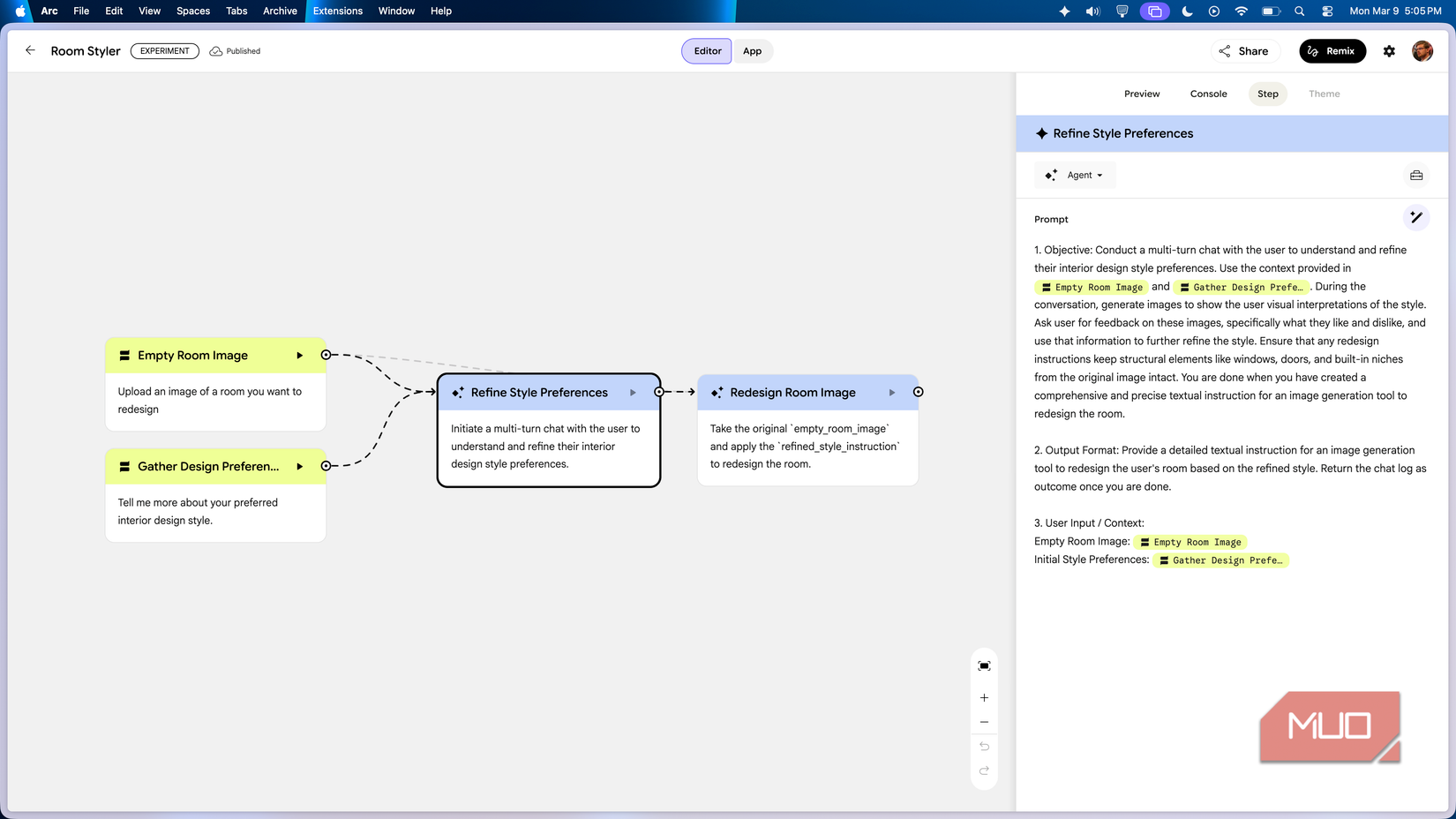
Speaking of context, the agent step can take user input actions to the next level with multi-turn chats. With a user input action, you have one chance to enter the information the Opal mini app needs to produce its output. If you have more to say, you'll need to make more user input actions chained together as part of the larger workflow. However, the AI agent now has the ability to start an interactive chat with the end user, allowing it to collect all the information it needs as context in a single action.
When building Opal mini apps, you should use the agent steps and interactive chats any time the output results aren't what you expected. With basic user input actions, the AI model might not be getting the information it needs to generate the right output. By using a multi-turn chat instead, you can let the mini app decide how much context it requires. In one instance, the agent might only need to ask a question or two to build its knowledge base. In another, it might be a much longer conversation gathering the right context for your mini app.

Where Opal works (and where it doesn't)
Google's Opal mini app builder is great for tasks you might repeatedly use a large language model chatbot, like Gemini, to handle. For example, if you need to generate an image in a specific style, building an Opal mini app could be a better option than using the same prompt in a Gemini chat repeatedly. Bigger projects, however, might require a more advanced AI vibe coding solution. If you need more from your app builder, give Google AI Studio or Google Antigravity a try.